
Photogrammetry vs 3D Scanning: What's the Actual Difference?
Most people use "3D scanning" as a single term for a dozen unrelated technologies. It isn't. LiDAR, structured light, time-of-flight, and photogrammetry all produce a 3D model of a real-world object — but they work in fundamentally different ways, win on different jobs, and cost an order of magnitude apart from each other. If you've ever wondered whether a Pro iPhone makes photogrammetry obsolete, or whether a €40,000 industrial scanner would beat your camera, the honest answer is: it depends which one, on which job.
This is article three of a ten-part series. Article one explained what photogrammetry actually is and article two walked through how to capture for it. This one places photogrammetry inside the wider 3D capture landscape, so you can pick the right tool — or recognise when "3D scanning" in someone's marketing copy means something completely different from what you thought.
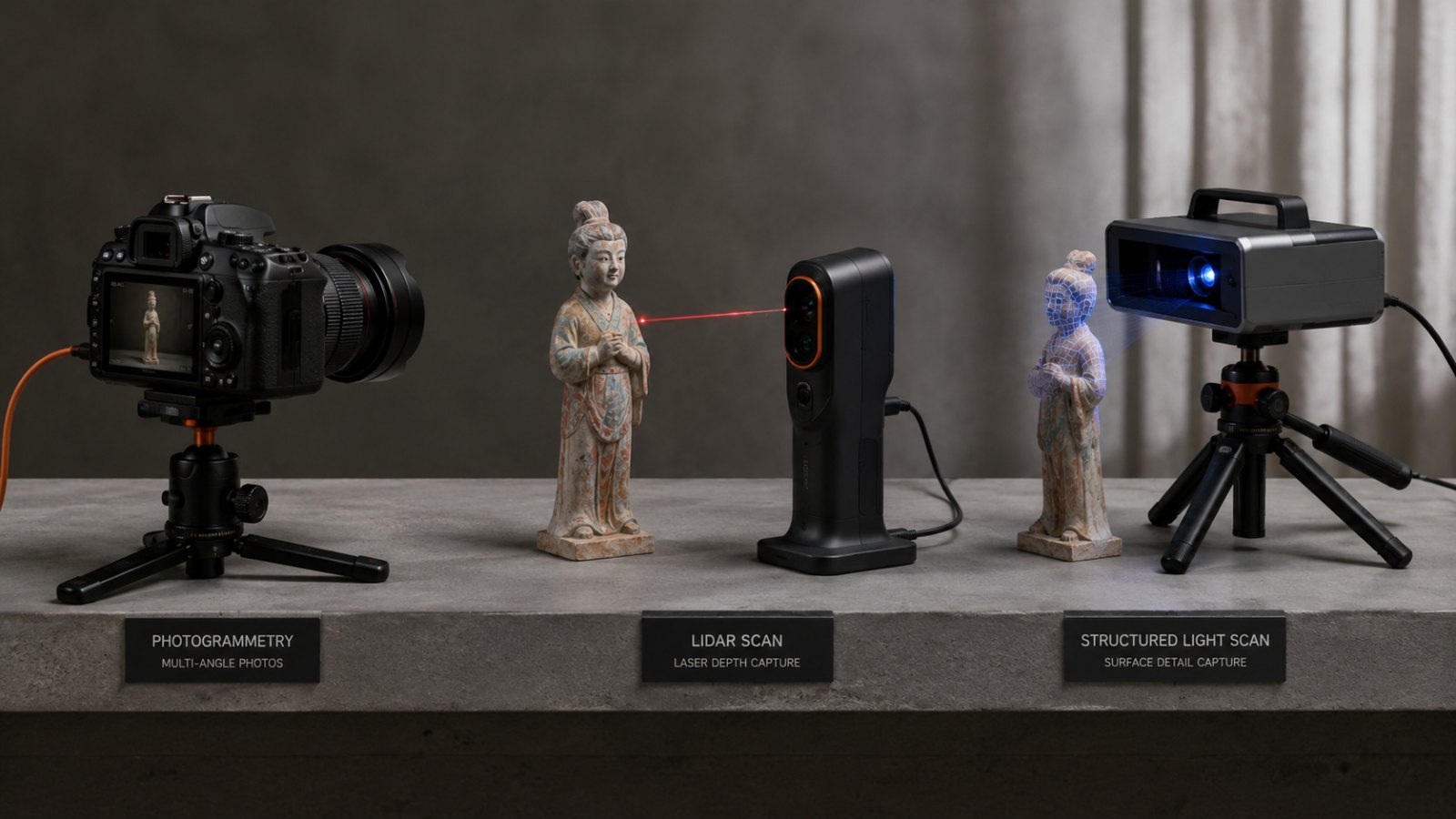
"3D Scanning" Is an Umbrella Term
The phrase "3D scanning" gets applied to anything that produces a 3D model from the real world. That's like calling cars, motorbikes, and electric scooters all "vehicles" and then arguing about which one is fastest without specifying for what.
Underneath the umbrella sit four distinct technologies that anyone doing serious 3D capture will eventually encounter. The differences aren't cosmetic — they change what you can scan, what it costs, how long it takes, and whether you need to control the lighting in the room.
The Four Methods, Plainly Explained

Photogrammetry takes ordinary photographs from many angles and computes 3D geometry from them. The camera is just a camera — no special sensor, no special light. The intelligence lives in the software, which finds matching features across photos and triangulates each point's position in space. Output: a textured mesh with real-world dimensions and the actual colour of the surface.
LiDAR (Light Detection and Ranging) shoots pulsed laser beams and measures how long each pulse takes to bounce back. Distance equals time multiplied by the speed of light, divided by two. Do this hundreds of thousands of times per second and you get a dense point cloud — a swarm of XYZ coordinates with no colour, just intensity. LiDAR works in total darkness, can penetrate gaps in vegetation, and scans huge outdoor scenes quickly. (YellowScan, Matterport)
Structured light projects a known pattern — typically stripes or a grid — onto the object and reads how that pattern deforms with a camera offset to the side. The distortion encodes the surface geometry. Structured light is the dominant technology for small, high-precision industrial scanning: dental impressions, jewellery, machine parts. It needs a controlled lighting environment, but the accuracy is exceptional. (The Future 3D)
Time-of-flight (ToF) is the simpler cousin of LiDAR. A single pulse, often infrared, illuminates the whole scene; the sensor measures the return time per pixel. The Microsoft Kinect, the front-facing depth sensor on Face ID iPhones, and many AR headsets use ToF. It's fast and integrates into small devices, but its accuracy is well below what LiDAR or structured light can deliver.
Where Photogrammetry Wins
Photogrammetry's three durable advantages are cost, colour, and accessibility.
Cost. A phone camera and free software get you in the door. The next rung — a used mirrorless body and a prime lens — costs roughly the same as a tank of fuel. The cheapest production-grade LiDAR scanner is a five-figure purchase; a Faro or Leica system clears six figures.
Colour. Every pixel of the original photographs ends up on the surface of the model. LiDAR sees intensity, not colour. Structured light cares about geometry, not appearance. If the final deliverable is something a customer will look at — a museum artefact, an e-commerce product, a game asset — photogrammetry's photoreal texture is the reason you pick it.
Accessibility. No specialist hardware, no calibration rig, no controlled lighting. Outdoor overcast light is enough. The barrier between "I want to scan this" and "I'm scanning it" is shorter than for any other method.
The trade-off: photogrammetry needs ambient light and visible surface texture. A featureless white wall, a polished chrome bumper, or anything in pitch dark will defeat the algorithm. (Workarounds exist — matte spray, cross-polarisation — and we'll get to them in article ten.)
Where LiDAR Wins
LiDAR earns its premium in three scenarios:
- Low light or no light. A pulsed laser doesn't care whether the sun is up. Tunnels, caves, mines, nighttime forensics — LiDAR is the only option that just works.
- Dense vegetation. LiDAR's pulses can find gaps between leaves and reach the ground beneath, which is why archaeologists use airborne LiDAR to discover overgrown ruins. Photogrammetry sees only what light hits the camera, so the canopy hides everything below it.
- Large outdoor scenes, fast. Surveying a kilometre of road, a quarry, or a city block — terrestrial or airborne LiDAR captures it in minutes. Equivalent photogrammetric coverage would mean hundreds or thousands of photos.
The geometric output is also typically denser per square metre than photogrammetry, which matters for surveying tolerances. (YellowScan)
Where Structured Light Wins
Structured-light scanners are the choice when precision and small scale are non-negotiable. Industrial QA, dental, medical, jewellery, reverse engineering of mechanical parts — the systems used in those workflows hit sub-100-micron accuracy on objects that fit on a desk. (The Future 3D)
The limits: the setup is bulky, the working volume is small, the lighting must be controlled, and the hardware is expensive. Structured light isn't going outside to scan a building. It's staying in the lab, scanning the thing on the bench.
The iPhone LiDAR Question
This is the source of more confusion than any other point in 3D capture, so it deserves its own section. The Pro iPhones (12 Pro onward) include a small LiDAR sensor on the back, and apps like Polycam, Scaniverse, and 3D Scanner App advertise "LiDAR scanning." The reasonable assumption is that the LiDAR sensor produces a better scan than the camera does. The reasonable assumption is wrong.
A peer-reviewed field study comparing iPhone Pro capture modes found that the photogrammetry ("Photo") mode in Polycam was more accurate than the same app's LiDAR mode on the same hardware. The iPhone Pro's LiDAR sensor resolves detail only on the order of a few centimetres at typical capture distances — fine for AR placement and room mapping, far too coarse for capturing an object. (PMC study)
Other research makes the same point: app choice can matter more than sensor choice. Comparing iPhone capture apps against a terrestrial laser scanner at room scale, Polycam produced roughly 5 cm of mean deviation while Scaniverse produced around 44 cm — nearly nine times worse. Those are building-scale figures, not object-scale; on a desk-sized object the absolute gap is far smaller, but the ranking holds. (MDPI study) The lesson: "I have iPhone LiDAR" tells you almost nothing about scan quality. Which app and which capture mode you used tells you more.
For object capture on iPhone, photogrammetry wins. For room mapping at the scale of a real estate floor plan, LiDAR has the speed advantage. The two technologies don't compete on the same job.
A Decision Table
| Job | Best method | Why |
|---|---|---|
| Small object, real colour, low budget | Photogrammetry | Phone + free software is enough; texture is photoreal |
| Industrial QA, sub-millimetre tolerance | Structured light | The only method that hits the required accuracy on a desk-scale part |
| Outdoor terrain, large site, fast | LiDAR (terrestrial or airborne) | Scales to hectares in minutes; works in dim light |
| Heritage artefact, museum display | Photogrammetry | Colour and texture matter; portability matters; non-contact |
| Room mapping, real estate | LiDAR (iPhone Pro or dedicated) | Speed beats precision for this use case |
| Forest floor under canopy | LiDAR (airborne) | Only method that gets through dense vegetation |
| Dental impression, jewellery | Structured light | Sub-100 µm accuracy on small parts |
| Reflective or transparent object | Structured light (with surface treatment) | Photogrammetry struggles; LiDAR returns false pulses |
The pattern: no single technology wins everywhere. The question isn't "which is best" — it's "which matches this job."
Where Replica Fits
Replica is a native macOS photogrammetry app, so it sits in the first three rows of that table — small to medium objects, heritage, anything where photoreal colour matters and the working budget is "what you already own." Replica processes everything locally on your Mac, with no cloud upload, and exports to USDZ, OBJ, FBX, GLB, and STL.
What Replica doesn't do: scan a forest, a quarry, or the inside of a tunnel. Those are LiDAR jobs. It also won't hit dental-grade sub-100-micron accuracy — that's structured-light territory. If those are your needs, no consumer photogrammetry tool is the right answer, and you should be looking at industrial scanner vendors instead.
For everything in between — the rubber duck on your desk, the carving over a doorway, the prop for a short film, the artefact in a glass case — photogrammetry is the cheapest path that doesn't compromise on the result, and a Mac is enough hardware to run it end-to-end.
If you'd like to see the output before scanning anything yourself, the free Appian Tomb dataset is 116 photos plus the finished 3D model — drop the photos into Replica and watch a real reconstruction happen. The Getting Started manual covers the full first-project workflow.
Next in the Series
Now that you know where photogrammetry sits in the wider 3D capture landscape, the next obvious question is the most-Googled one: How Many Photos Do You Need for Photogrammetry? A table of practical numbers above the fold, then the overlap-versus-count discussion below.
Questions or a scan that won't behave? Reach out at info@ambiensvr.com.